“We installed the pixel, but Meta cannot see half of our sales.”
It is one of the sentences we hear most often from advertisers. The dashboard shows 40 sales; the e-commerce back end has 80 orders. The problem is usually not the advertising but the way the data reaches Meta.
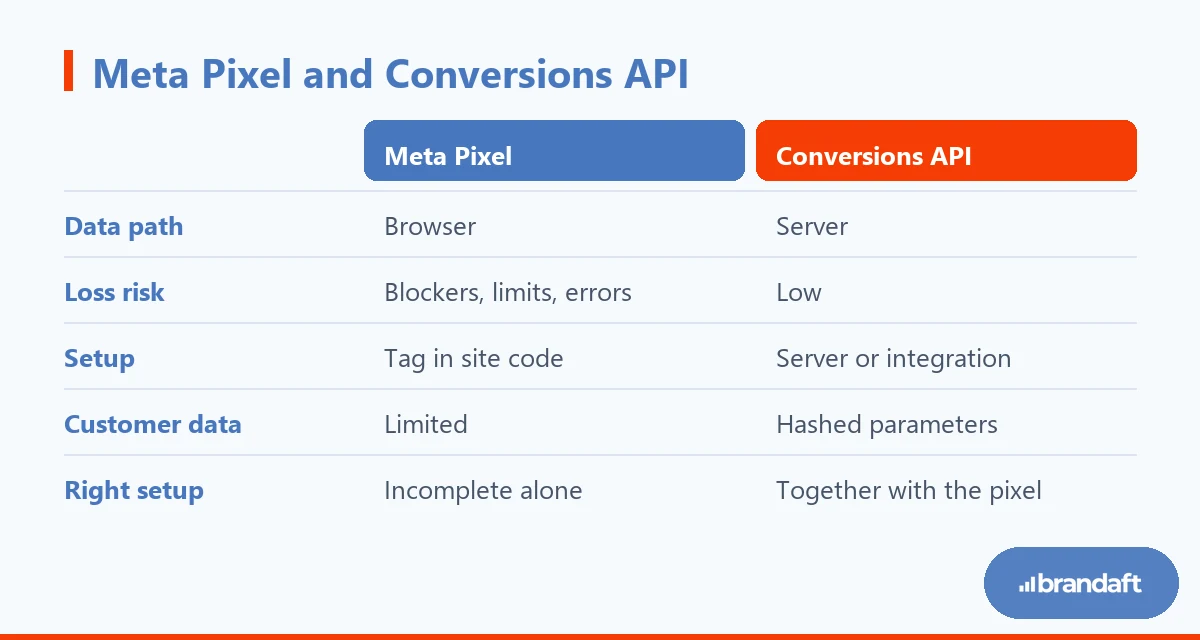
The Meta Pixel runs in the browser. Like everything that runs in the browser, it is affected by ad blockers, browser restrictions and connection errors. Meta says so plainly: data coming from the Conversions API is “less affected by browser loading errors, connectivity issues and ad blockers than the Meta Pixel” (Meta Business Help Centre).
The Meta Conversions API exists to close that gap. The pixel tells the story from the browser; the Conversions API tells it from the server.
In this guide, we’ll cover:
- Whether the Conversions API is installed instead of the pixel or alongside it
- Why the pixel alone produces incomplete data
- Event deduplication, which stops the same sale being counted twice
- The effect of event match quality on ad cost
- Four routes for a CAPI setup, and which one is right for which company
- Verifying the setup, and what to watch on the privacy side
At Brandaft we look at measurement before building campaigns in our social media work . Optimising a campaign that runs on incomplete data is like dieting with a broken scale.
What Is the Meta Conversions API? (Instead of the Pixel, or Alongside It?)
The Conversions API is a connection that sends the events happening on your site or in your system not through the browser but directly to Meta from your own server . Purchases, form submissions and add-to-cart actions are all delivered this way.
The point most often confused is this: CAPI does not replace the pixel. Meta recommends using the two together for website events; website events sent through the API are tied to your pixel and behave exactly like pixel events in ad optimisation (Meta Business Help Centre).
The right setup is this: the pixel sends from the browser, server-side tracking sends the same event from the server as well, and Meta matches the two and counts one event. When one drops, the other keeps carrying the data.
So where exactly does the pixel drop?
Why Is the Pixel Not Enough on Its Own?
The browser side has become a steadily narrowing space for measurement in recent years. There are four main points of loss:
- Ad blockers: the pixel request is never sent and the event never reaches Meta.
- Browser restrictions: the lifetime of third-party cookies and identity data is getting shorter; attribution weakens.
- iOS privacy settings: for a user who does not allow tracking, the browser-side signal narrows.
- Technical errors: the page closes early, the connection drops, the script does not load; the event is lost.
Together these push the conversion count you see in the dashboard below reality. The result is not only an incomplete report: Meta’s delivery algorithm also learns from incomplete data, goes to the wrong audience and acquisition cost rises. We explained the chain on the cost side in detail in our why CPA is rising article.
Incomplete data is expensive advertising.
Social media that drives sales, not likes
We design content planning, community management and advertising as a single performance system. We measure results in revenue, not followers.
REQUEST A QUOTESo CAPI is not a “technical luxury”; it is infrastructure that directly affects campaign economics. But when it is set up wrongly it creates a problem of its own.
How Does Event Deduplication Work? (So One Sale Is Not Counted Twice)
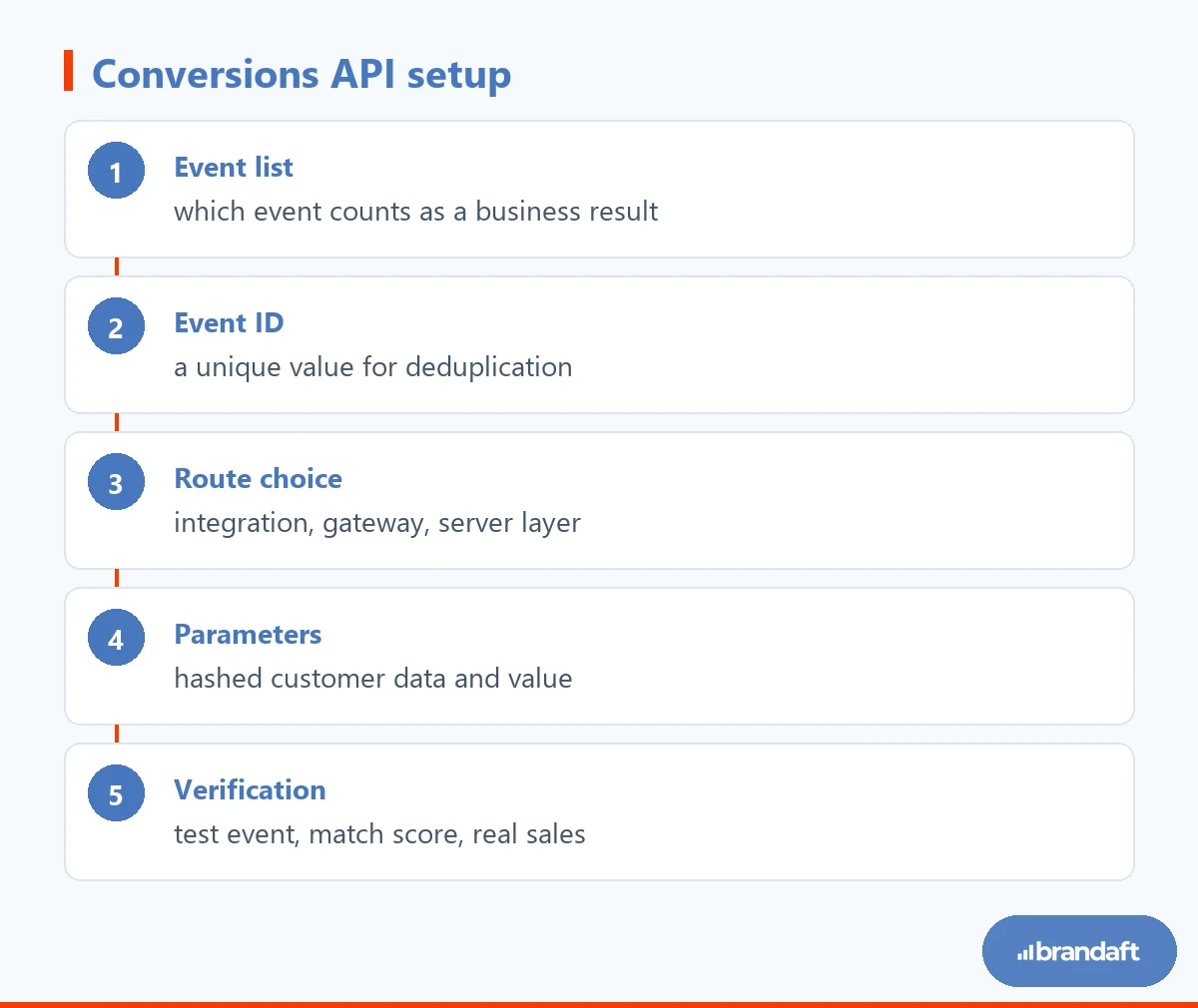
If both the pixel and the server send the same purchase, Meta may take it for two conversions. To prevent that, Meta uses the event deduplication mechanism: if two records carry the same event name and the same event ID, they are counted as a single event.
The rule is simple in practice: a unique ID is generated for each event, and the same ID is sent from both the browser and the server. A value that is already unique, such as an order number, is suitable for the job.
When deduplication is not set up, you see two typical results: the conversion count rises above reality, and cost metrics look better than they are. That shifts budget to the wrong campaign. For reading ad metrics together, our how to measure ad performance article gives a good framework.
Once deduplication works, the next subject is the quality of the data you send.
Why Does Event Match Quality Matter?
Meta can use the event you send only to the extent that it can match it to a person. The measure of how strong that match is event match quality. Meta says that by sending more customer information parameters through the API you can raise both the number of matched events and the match quality.
In practice the parameters you can send are fields such as email, phone, first and last name, city and country. These go to Meta not as plain text but hashed — that is, encrypted in a form that cannot be reversed. Browser-side identifiers and IP data strengthen the match further.
The picture we see in the field is this: CAPI has been installed, but only the event name is sent and there are no customer parameters. That setup works technically, yet because the match stays weak it does not produce the improvement expected.
Quality starts with the setup. Now let us move to the setup itself.
Four Routes for a Meta CAPI Setup: Which One Fits You?
There is no single right way to set up the Conversions API; it changes with the company’s technical capacity.
- Ready-made platform integration: on platforms such as Shopify and WooCommerce it is set up with a few settings. The fastest route for small and mid-sized e-commerce.
- Conversions API Gateway: Meta’s solution that requires no server setup; suitable for teams with no developer resource.
- Server-side tag manager: you build your own server layer where events are collected. You can send from one place both to Meta and to other platforms; the most flexible model for mid-size and large scale.
- Direct API integration: events are sent by writing them into the back end in code. It gives the most control and asks for the most developer time.
When deciding, look at three questions: does the site run on a platform with a ready-made integration, can you assign a developer, and are you building measurement for Meta alone or for every platform? If the answer to the third is “all of them”, a server-side layer is the cheapest option in the long run.

Once the route is chosen, the setup order is the same in every model: first you decide which events will be sent, then you plan the event ID, then you add the parameters, and you verify last. We apply the same discipline on the GA4 side; the detail is in our GA4 conversion tracking guide.
Which Events Should You Send? (Priority Order)
Sending every event is not a good idea. Meta’s delivery system tries to multiply whichever event it is optimising for; crowding the list unnecessarily weakens the signal.
The priority order that works in practice is this:
- Purchase or quote request: the main event tied directly to revenue. Value and currency must be sent.
- Add payment info and add to cart: the two steps closest to purchase; in small accounts they speed up the learning phase.
- Registration and subscription: in subscription businesses these can stand in for the main event.
- Content view: only for building a remarketing audience ; it should not be made an optimisation target.
In an account taking a handful of sales a month, optimising directly for purchase is hard; the system cannot find enough data to learn from. In cases like that, targeting an intermediate event close to purchase while continuing to measure purchase works better.
There should be a business decision behind every event you send. Events added “just in case” crowd the report without making the decision any easier.
What Should You Watch on the Data Protection Side?
Sending data from the server does not mean you may send data without consent. Personal data rules apply to CAPI just the same.
Three points are critical. First, user data is sent hashed; the raw email or phone number is not transmitted. Second, if cookie and tracking consent has not been taken, sending marketing events is risky; consent status must be carried to the server side as well. Third, your privacy policy must state clearly which data is transferred to Meta and for what purpose.
We explained how consent status changes measurement, and how data is modelled when consent is not given, in our Consent Mode v2 article. The same logic applies on the Meta side.
How Do You Verify the Setup?
The setup is not finished when events start appearing in Events Manager. Three checks are needed.
First, on the test events screen, see that an event you trigger yourself arrives both from the browser and from the server and is counted as a single event . If deduplication is not working, the same transaction lands as two rows.
Then watch the event match quality score. It is expected to rise within a few days of setup; if it does not, the customer parameters you send are incomplete.
Finally, compare the dashboard with reality: the purchase count Meta reports should come close to the order count in your e-commerce back end. If the gap does not close, there is a missing or wrongly matched step in the event list. We gathered the other things to check before measurement, when ads do not turn into sales, in our traffic but no sales article.
The time Meta ads need to produce results, and the learning phase, should be read alongside this picture; we covered that in our when Meta ads start producing sales article.
Conclusion: CAPI Is Not a Tag, It Is Data Infrastructure
Setting up the Conversions API is not adding a piece of code to a dashboard. It is deciding which event counts as a business result, how that event will be deduplicated, and which customer data will be sent with which consent.
The pixel tells you what it saw. The server tells you what actually happened.
If there is a gap between the dashboard and real sales in your Meta campaigns that will not close, look at the measurement layer first. If you are not sure where to start, let us map your current setup together, beginning with our free diagnostic report .
Frequently Asked Questions About the Meta Conversions API
What is the Meta Conversions API and what does it do?
The Meta Conversions API is a connection that sends events happening on your site or in your system directly to Meta from your own server. Its purpose is to reduce browser-related data loss and to feed ad optimisation with more accurate data. Events such as purchase, form submission and add to cart are delivered this way. Meta states that the best result is achieved when it is used together with the pixel.
Does the Conversions API replace the pixel?
No — for website events the two work together. The pixel sends the event from the browser, the API sends the same event from the server, and Meta matches them and counts a single conversion. If you remove the pixel you lose the browser-side identifiers and match quality falls. The correct setup is not “one or the other” but both working together.
Do I need a developer to set up CAPI?
Not always. On platforms such as Shopify or WooCommerce it can be set up with a ready-made integration, without a developer. Meta’s Conversions API Gateway also requires no server setup. But on a custom-built site, if you are setting up a server-side tracking layer or sending CRM data, developer support is needed.
How is event deduplication done?
Where the same event is sent from both the browser and the server, the two records must carry the same event name and the same unique event ID. Meta matches those two fields and counts the record as a single conversion. Values that are already unique, such as an order number, can be used as the event ID. If deduplication is not set up, conversions inflate and cost metrics look better than they are.
Is server-side tracking safe from a data protection point of view?
Sending from the server does not on its own grant an exemption; personal data rules apply exactly as before. Customer information is sent to Meta hashed — that is, encrypted in a form that cannot be reversed. If marketing consent has not been taken from the user, sending events carries risk, so consent status must be carried to the server side as well. Your privacy policy must state clearly which data is transferred and for what purpose.
How long does a Meta Conversions API setup take?
With a ready-made platform integration, setup can be finished in a few hours. If a server-side layer is being built, it usually takes a few days including the event plan, identity matching and the test process. The part that really takes time is not the technical setup but deciding which events will be sent and how the parameters will be filled. After setup, verification needs at least a week of data.