
When a business decides to change agencies, the conversation is usually about the handover schedule. The more important question should have been asked much earlier: who owns this account?
Google Ads has a technical answer to that question and most businesses do not find it out until handover day.
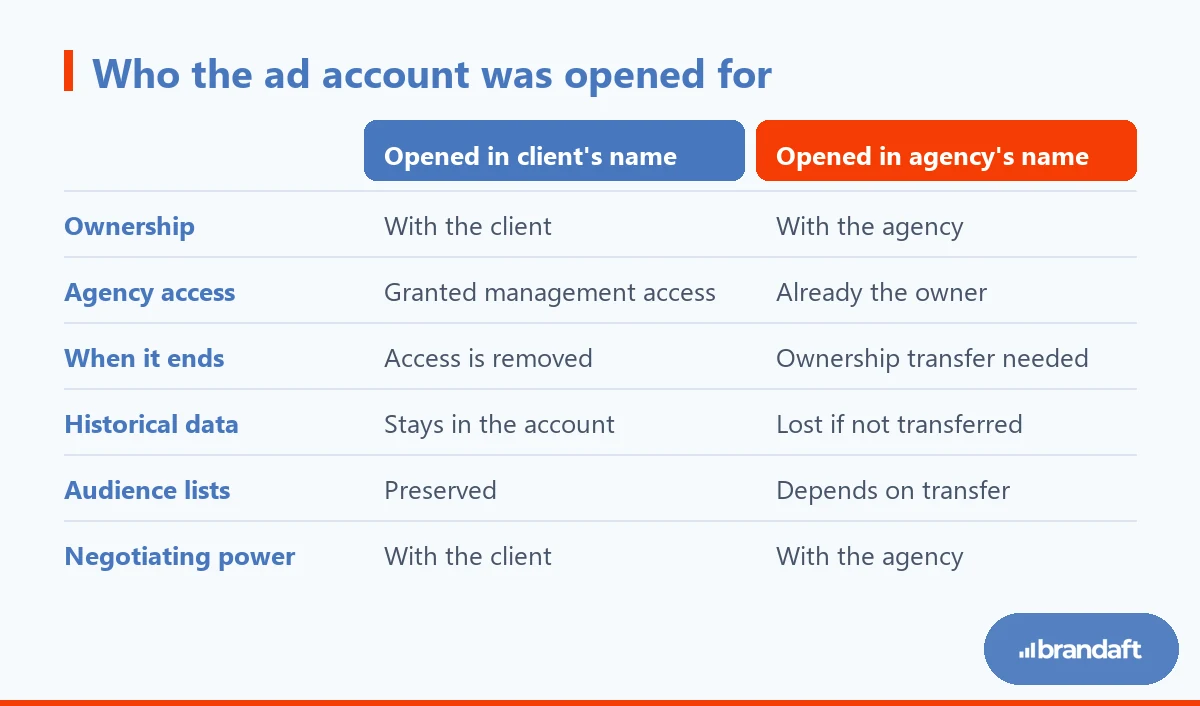
A client account can have only one owner. When a manager account creates a new account it automatically becomes the owner of that account; when it simply links an existing account, it does not become the owner by default (Google Ads Help).
Those two sentences decide the entire handover story of an agency relationship. If the agency opened the account in your name, the agency owns it.
In this guide we cover:
- What account ownership means technically
- The four assets lost in a handover
- How ownership is transferred
- A checklist for before and after the transfer
- What to put in writing when you start with a new agency
At Brandaft, we are an Istanbul-based Google Ads agency and we set up every engagement on one principle: what you build stays with you. Accounts are opened in the client's own name, ownership stays with the client, and we work with management access. We do not treat that as a favour but as a precondition for a healthy relationship — an agency that holds its client with a technical lock feels less pressure to do the work well.
What Account Ownership Actually Means in Google Ads
In Google Ads, access and ownership are two different things.
There are four access levels: admin, standard, read-only and email-only. These decide what you can do inside the account. Ownership is a separate layer: the owner holds full administrative access plus data access privileges, including information that can identify individuals.
The critical detail: an account can have only one owner. Ownership is not shared — it is transferred.
Users with administrative access to the owning manager account can move ownership to another manager. It is done in the Google Ads interface under Admin, on the Access and security screen, through the "Owner" column on the Managers tab.
Which channel is actually paying off?
We measure the return of each channel separately and put your budget where it returns the most. A plan based on data, not luck.
LEARN MOREThe Four Assets Lost in a Handover
Campaigns pausing is a temporary problem. The real losses are the kind you cannot get back.
Historical Performance Data
If the account is transferred, the data survives. If the account is rebuilt from scratch, it is gone. The difference comes down to how the agency approaches the handover.
When a new agency suggests opening a fresh account under its own manager, the question to ask is: what happens to the existing account's history? Years of conversion history, quality signals and accumulated learning do not move to a new account.
Conversion Actions and Tracking Tags
Conversion tracking is usually embedded in the website, not in the ad account. If the agency used its own tag manager container, your measurement leaves with the relationship.
The way to prevent that is to keep the container in the client's own account. We covered how tag management is set up and why container ownership matters in our Google Tag Manager guide and where conversion actions actually live in our GA4 conversion tracking article.
Remarketing Lists and Audiences
Remarketing lists build up over time and start from zero in a new account. If three years of visitor data cannot be transferred, the new agency has to wait months to reach the same audience again.
Where the audiences are defined is decisive here: inside Google Ads, on the Analytics side, or through the tag manager. We explained how audience architecture is built in our remarketing guide how to earn this.
Institutional Memory
This is the least discussed and most expensive loss: which keyword was excluded and why, which campaign was switched off and why, which creative failed and why.
None of that lives in a dashboard. If it is not written down during the handover, the new agency repeats the same mistakes and the business pays for them again.
How to Transfer a Google Ads Account, Step by Step
The technical part is simpler than it looks; the hard part is getting the order right.
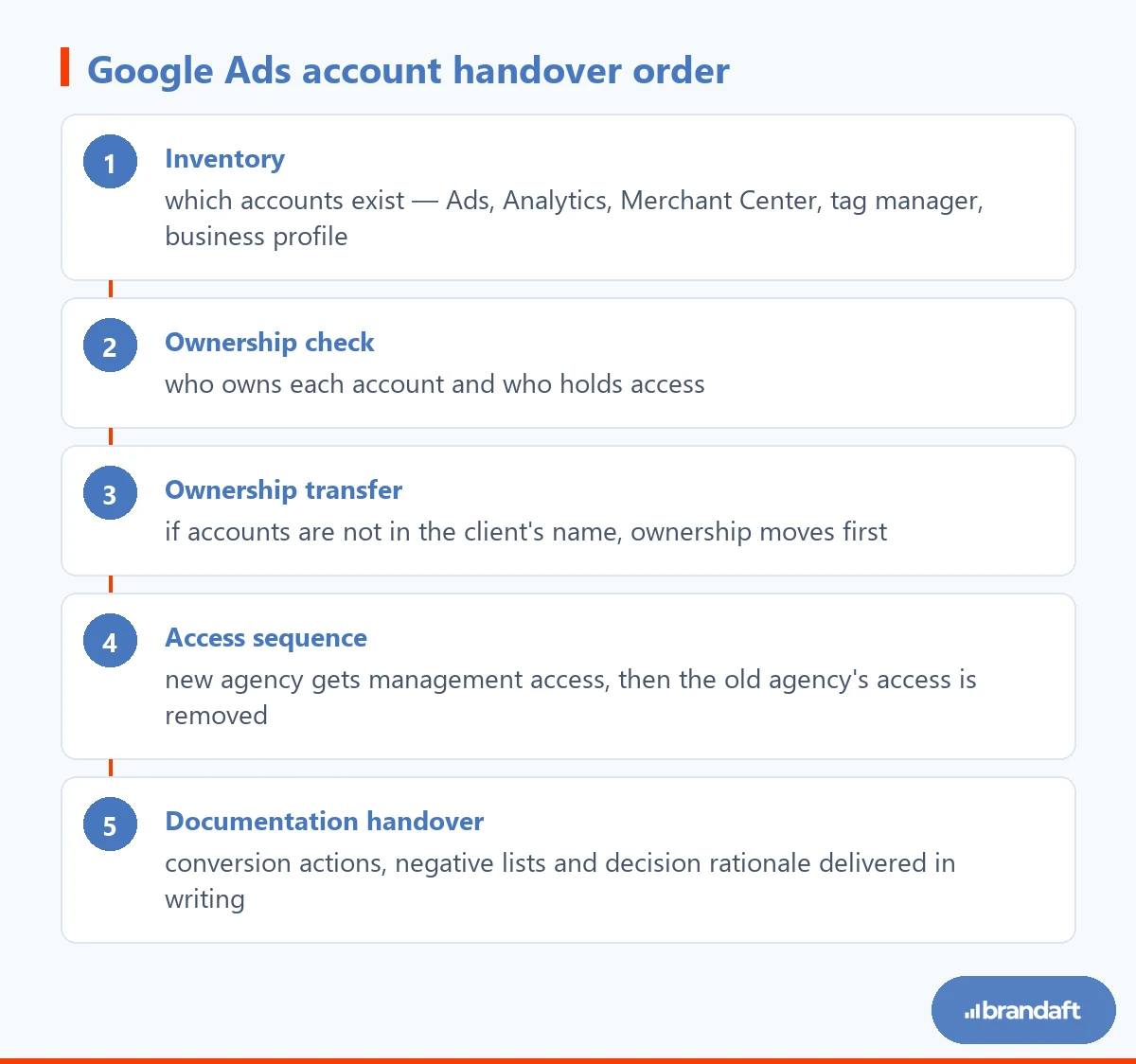
The first item is the one most often skipped. The ad account may be transferred, but if Merchant Center, the tag manager container or the business profile stay with the old agency, measurement and product data break. If you run Shopping campaigns, transferring Merchant Center matters as much as transferring Ads; we explained how product data works in our Shopping ads guide how to earn this.
In the fourth step the order matters: removing the old agency's access before the new agency has access leaves the account unmanaged. Campaigns keep running and nobody can intervene.

The First 30 Days After the Handover
Once the handover is done, the new agency's first job should not be launching campaigns. First you need to see what condition the inherited account is in.
Our approach: the first week is audit only. Whether conversion tracking actually fires, which events land in which bucket, whether the negative list is current and where the budget is going — each is checked one by one. We wrote that checklist out item by item in our Google Ads account audit article.
Fluctuation during this period is normal and partly unavoidable: access changes, tracking fixes and structural edits restart the learning period. A business that expects a guaranteed result in the first month from a new agency is buying an unrealistic promise.
Setting Up the Next Agency Relationship Correctly
The way to avoid going through this again is to put three things in writing when the relationship starts.
First, ownership: every account is opened in the client's name and the agency works with management access. Second, the measurement stack: the tag manager container and the analytics property belong to the client. Third, documentation: conversion actions, negative lists and the reasoning behind significant decisions are kept in a shared, regularly updated document.
If those three are written down, changing agencies becomes a technical procedure. If they are not, every change means starting over.
We went through the contract clauses and what should be settled up front in our article on the digital marketing agency contract in detail.
What You Build Should Stay With You
Account ownership should not be how an agency keeps its clients.
That is not only an ethical preference — it has a practical consequence. A client who is free to leave and stays is telling you the work is good. In a relationship held together by a technical lock, the pressure to perform weakens.
If you do not know whose name your account was opened in, do not wait for the relationship to end to find out. If you would like to review your current setup together, we can start with our free diagnostic report .
Frequently Asked Questions About Google Ads Account Transfers
How do I find out who owns my Google Ads account?
In the Google Ads interface, open Admin and go to the Access and security screen, then the Managers tab. There you will see the manager accounts that administer the account and which one is marked as "Owner". An account can have only one owner. If the agency opened the account in your name, the agency is most likely the owner; if it linked your existing account, it did not become the owner by default. Finding this out while the relationship is going well is far easier than finding it out when it ends.
How is account ownership transferred?
A user with administrative access to the owning manager account can move ownership to another manager account. It is done in the Google Ads interface under the Admin icon, on the Access and security screen, through the "Owner" column on the Managers tab. The destination manager account has to be linked before the transfer. Technically it takes moments; the real difficulty is getting the order right and not forgetting the other accounts.
Will I lose my historical data when I change agencies?
Not if the account is transferred — yes if a new account is opened. If the new agency proposes starting from scratch, past conversion data, quality signals and accumulated learning do not carry over. Remarketing lists start from zero as well. That is why the first question in a handover conversation should be whether the existing account will be taken over.
What should I do if the agency opened the account in its own name?
There is no need to panic: ownership is a transferable right and the change is made in the interface. What you should do is ask for ownership to be moved to you while the relationship is going well. It is healthier to raise it as standard business practice than as a sign of distrust. The same check should be made for Merchant Center, the analytics property and the tag manager container.
Should I pause campaigns during the transfer?
Usually not, and pausing does damage: paused campaigns re-enter the learning period when they restart. The right approach is to leave campaigns running and change access in sequence — give the new agency management access first, confirm control, then remove the old agency's access. Doing it the other way round leaves the account unmanaged for a while.
What should I expect from a new agency in the first month?
The output of the first month should be a diagnosis, not a performance increase. This is when you check whether measurement fires correctly in the inherited account, which events count as conversions, the state of the negative list and how budget is distributed. Because access changes and structural fixes restart the learning period, fluctuation is normal. An offer that guarantees results in the first month contains an unrealistic promise.