
“Conversions are going up in the dashboard, but nothing is changing in sales.”
In most teams that say this, the problem is not in the advertising or the SEO — it is in the definition of a conversion. When we looked at 28 days of data on our own site there were 146 form submission records; 113 of them were actually uses of a free rank-checking tool, and real quote form enquiries numbered just 3. The dashboard said “146 conversions”; three requests had reached the sales team’s desk.
Google changed the naming to make that distinction clearer too: Google Analytics 4 now calls these records key events ; on the Google Ads side the same thing is still called a Conversion (Analytics Help). The difference in names looks harmless, but it produces two different truths in two dashboards.
In this guide, we’ll cover:
- The difference between a key event and a conversion in GA4
- The micro and macro conversion split that has to be settled before setup
- Setting up GA4 conversion tracking in five steps
- What counting every form submission as a conversion costs, and how to fix it
- Importing conversions into Google Ads and verifying them
At Brandaft we build measurement as decision infrastructure, not as reporting decoration. data analytics work always starts the same way: we first verify whether the number in the dashboard has any equivalent on the sales side.
What Does a Conversion Mean in GA4? (Are a Key Event and a Conversion the Same Thing?)
Google Analytics 4 is event based. A page view, a click and a form submission are all events. When you mark an event as a “key event”, GA4 counts it as a business result and shows it separately in reports.
When you link to Google Ads, the key events you select are imported there as Conversion . The critical point: you do not have to import every key event you mark in GA4 into Ads, and you should not. Every record that goes to Ads trains the bidding algorithm.
A key event measures. A conversion optimises.
So the setup decision starts with two questions: what do I want to know, and what do I want to optimise? The answers are often not the same.
Before Setup: What Will You Count as a Conversion?
Before moving to the technical setup, the job is to translate the business goal into an event list. The micro and macro split helps here: micro conversions are interest signals, macro conversions are revenue signals.
Which channel is actually paying off?
We measure the return of each channel separately and put your budget where it returns the most. A plan based on data, not luck.
LEARN MORE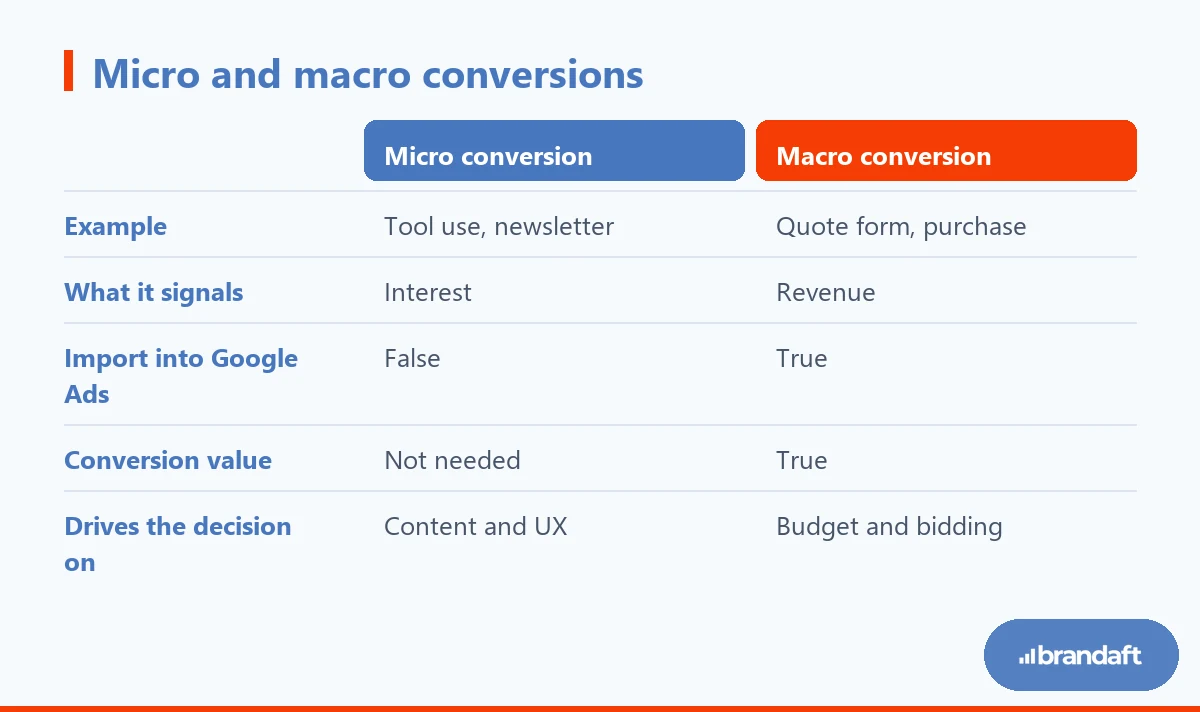
A common mistake is putting the two in one bucket. When a newsletter sign-up and a quote form are both “conversions”, the total inflates and which channel brings real demand becomes invisible. We covered which metric means what, and when, in our which marketing metrics matter article.
If your list is ready, we can move to the setup.
How to Set Up GA4 Conversion Tracking (5 Steps)
A Google Analytics 4 conversion setup is the kind of job you have to redo from scratch when the order is broken. The right order is this:
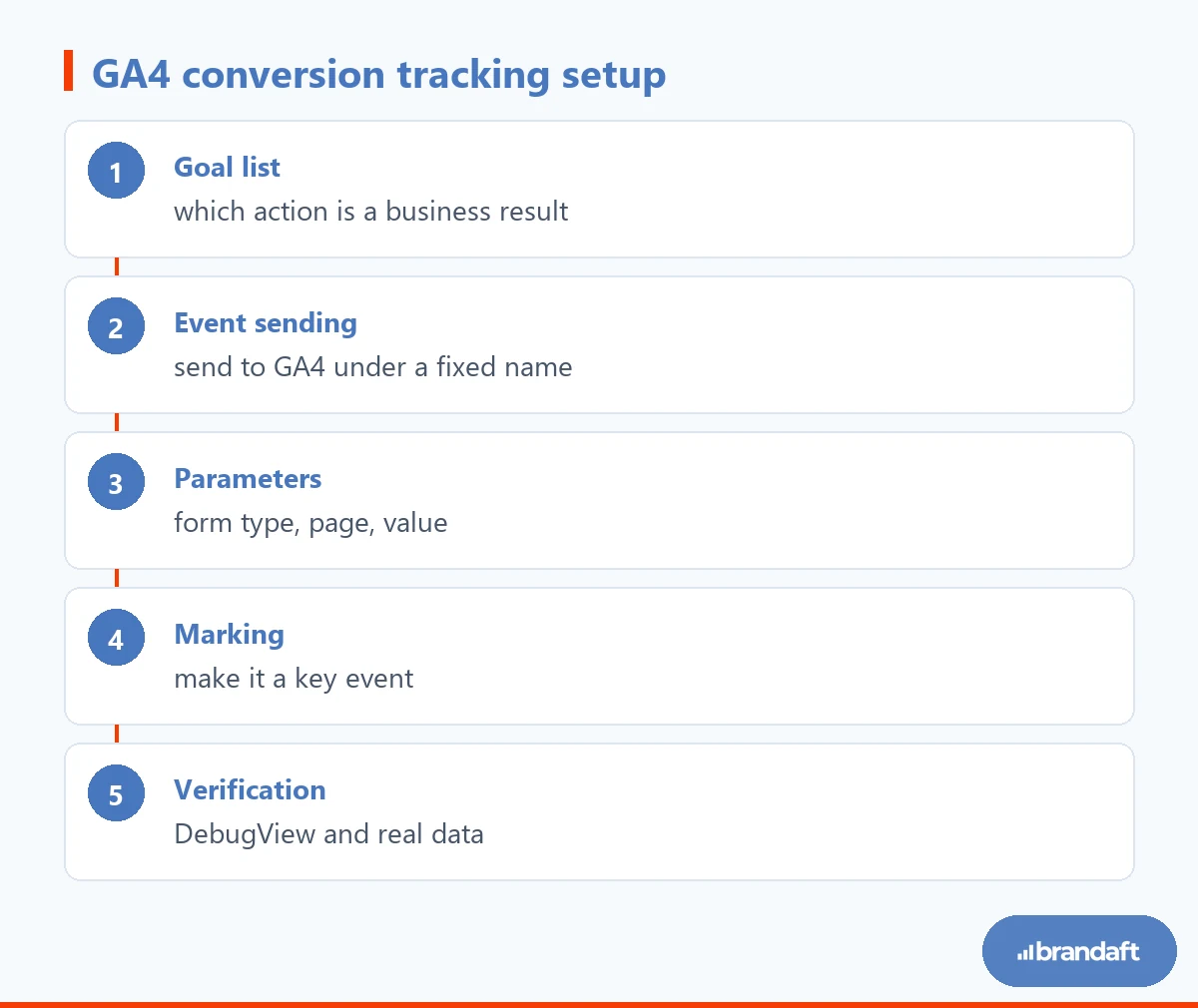
The first step sits on the business side, the second and third on the development side. You can send events to the site through Google Tag Manager or by writing them into the code directly; what matters is that the event name is fixed and the parameters are meaningful. For instance, instead of a single form_submit event, sending the form type as a parameter saves your reporting from the start.
In the fourth step you mark the event as a key event in the GA4 interface; Google states you can do this without a code change (Analytics Help). The fifth step is not treating the setup as finished until you have seen it actually work.
So what happens when this order is skipped? We lived through the answer on our own site.
The Most Expensive Mistake: Counting Every Form Submission as a Conversion
On our own site the setup had grown over the years and every form had started sending the same event. The result is the picture at the top of this article: 146 form submissions in 28 days, 113 of them from the free rank checker tool, real quote requests 3. On top of that, the “form open” event was marked as a conversion too — so a visitor who saw the form and gave up was counted as a success.

This has three concrete costs:
- The advertising side learns the wrong thing. Every fake conversion that goes to Ads pushes the algorithm towards the audience that performs that behaviour. When you go looking for why acquisition cost is rising, the problem often starts here; we explained the detail in our article on why CPA is rising. why CPA is rising article.
- Content decisions are made wrongly. You cannot see which article brings demand; pages with high traffic and zero demand look good.
- Trust in reporting ends. The sales team stops looking at the dashboard.
The fix is technically simple: tag every form with its type and separate the events. On our site we split forms into “quote request” and “tool use”; tool use flows as a separate event and is not counted as a conversion. That way tool use is still measured as an interest signal, but it no longer mixes with the sales goal.
Once the setup is fixed, the next question is how this data moves to the advertising side.
How Do You Import GA4 Conversions into Google Ads?
For the import, the GA4 property and the Google Ads account have to be linked. Once the link is in place, key events in GA4 become importable in Ads and can be used in bidding strategies.
Three rules work here. First, import only macro conversions into Ads; let micro conversions stay in GA4. Second, do not double count the same result by importing it both with an Ads tag and through GA4. Third, enter a conversion value if you can: even an average quote value is a better signal than a valueless conversion.
If you want to read the metrics on the advertising side together, our article on how to measure ad performance how to measure ad performance completes this picture.
How Do You Verify the Setup?
The setup is not finished the moment a number appears in the dashboard. Verification has three stages.
First, in GA4’s DebugView screen, trigger the event yourself and watch it appear with its parameters. Then, in the real-time report, see the same event arriving from other users as well. Finally, wait 24–48 hours and check that the number in the standard reports is realistic: if you see 120 conversions on a site that takes 3 enquiries a day, the measurement is broken.
Look again a week later and ask this question: is the conversion count in the dashboard the same as the number of real enquiries landing in your CRM? If those two numbers do not match, the fault is not in the setup but in the definition. We described the approach to tying measurement to sales in our conversion-focused SEO article; and for building the demand flow itself, we have our lead generation system guide.
Why Do the Numbers Not Match Across Platforms?
Even when the setup is right, GA4, Google Ads and Meta count the same conversion differently. There are three main reasons: attribution models differ, date ranges are calculated differently, and data stays incomplete for visitors who have not given cookie consent.
The consent side matters especially: when consent is not given, platforms estimate the conversion by modelling it. We covered what that structure breaks in measurement in detail in our Consent Mode v2 Consent Mode v2 article.
The right expectation is this: do not look for one hundred per cent agreement between platforms. Follow the change over time within the same platform, and make the decision alongside the real number on the sales side.
Conclusion: A Conversion Is Not an Event, It Is a Decision Input
The hard part of a GA4 setup is not technical. The hard part is answering “what are we counting as success” honestly.
Seeing 146 conversions in a dashboard feels good. If 3 enquiries reached the sales team, that number is not a success but a warning.
If you are not sure whether your setup measures reality, start with our free SEO diagnostic report : we will map out together which pages bring real demand and which conversions are inflating the count.
Frequently Asked Questions About GA4 Conversion Tracking
How do you create a conversion in GA4?
First, the action you want to measure has to be sent from the site to GA4 as an event. Once the event starts arriving, you mark it as a key event from the event list in the Admin section of the GA4 interface. If the event is newly being sent, it can take a few hours to appear in the list. Marking does not work retroactively; only data from after you mark it is reported as a conversion.
What is the difference between a key event and a conversion in GA4?
They are two names for the same action in two different places. In Google Analytics 4 reports these records are called key events. When the same record is imported into Google Ads it appears there as a conversion and is used in bidding strategies. That is why marking it in GA4 and importing it into Ads are two separate decisions.
Why does Google Analytics 4 conversion data not match Google Ads?
Because the two platforms count the same event by different rules. The attribution model, the day the conversion is recorded against, and the modelling applied to visitors without cookie consent all differ. Small differences are normal; persistent, large differences usually come from double counting or incomplete tagging. When deciding, look not at a single dashboard but at the real number on the sales side.
Which actions should I mark as conversions?
Mark the actions tied directly to your business goal: quote form, purchase, phone call, WhatsApp click. Actions such as newsletter sign-up, file download or tool use are interest signals; measure them, but do not import them into Google Ads. The general rule is this: do not import a behaviour you do not want the ad algorithm to multiply as a conversion.
How long does a GA4 conversion tracking setup take?
On a standard corporate site, the event plan, tagging and verification usually take a few working days. What extends the timeline is not technical difficulty but the decision about “what we will count as a conversion” not being settled. On e-commerce sites the process takes a little longer because product and purchase data are added as well. After setup, verification needs at least a week of data.
Is Google Tag Manager essential for conversion tracking?
It is not essential; you can also send events by coding them into the site directly. But Tag Manager, because it makes managing events and parameters easier without waiting for a developer, is preferred in most projects. What matters is not which tool you use but that event names and parameters stay consistent. Inconsistent naming makes reports unreadable in the months that follow.