
“Speeding up a site does not only improve the user experience; it also lets Googlebot crawl the site faster and more often.” – Google Webmasters
That line is usually read in the context of performance optimisation. In reality it points to something much bigger:
Crawl budget is not one of SEO’s technical footnotes; it is the fuel that makes indexing work.
Google does not give every site unlimited time and requests. On the contrary, there is an invisible but very real resource allocation behind every site. That resource is this:
Crawl budget = the time Googlebot gives your site + the request credit it can spend on it
And the way that budget is spent shapes how Google “reads” your site. Let us make the critical distinction clear:
A page being crawled does not mean Google will add it to the index. But a page that is never crawled has no chance of being indexed at all. That is why crawl budget is about far more than “how many of my pages are crawled?”. The real question is this:
With the same crawl budget, are you showing Googlebot the pages that genuinely matter, or are you making it spend its time on filters, parameters and URLs that lead nowhere?
In this guide we will treat crawl budget not as a metric but as an efficiency problem — when it genuinely is a problem, when it is merely misread and, most important of all, where you need to start we’ll clarify.
Is Crawl Budget a Problem for Every Site?
Short answer: No. But when it is looked for in the wrong place, it hides the real problem.
Small and Mid-Sized Sites : For most small sites it is usually not crawl budget, crawl efficiency and prioritisation that is the problem.
- The number of URLs is limited
- Googlebot can crawl the site comfortably
- But the bot’s time is going on unimportant or repetitive pages instead
- Critical pages are not getting strong enough internal links and signals
In that case the real issue is not “why is Google not crawling me?”; “is Google looking in the wrong places when it crawls?” is the question.
Large Sites (Where the Real Risk Is) : Crawl budget problems mainly show up in structures like these:
- E-commerce sites
- Classifieds / real estate / automotive platforms
- News sites
- Large blog structures with many categories and filters
On sites like these the problem is not that Googlebot is reluctant; it is that resources are consumed far too quickly.
Quick Threshold Check: Are You at Risk?
If you recognise several of the signals below, crawl budget may well be a real issue for you:
- A structure that generates thousands (even tens of thousands) of URLs
- URLs multiplying through filters, sort orders and parameters
- A site that adds content daily or very frequently
- Important pages sitting in “discovered – currently not indexed”
- A rising number of unindexed strategic pages
At this point the matter is no longer theoretical. What Googlebot crawls and what it ignores, rather than how much it crawls, decides your visibility directly.
How Does Googlebot Set the Budget? (Two Main Pillars)
Google does not set crawl budget by looking at a single signal. The decision comes out of two basic mechanisms working together.
- Crawl Rate Limit : This is about how fast Googlebot can crawl your site. Google does not want to strain your infrastructure. If the server is slow, throws frequent 5xx errors or lets requests time out, the bot automatically backs off. This is not a penalty; it is a protective reflex. Put simply: the more stable and fast the site is, the more aggressively Googlebot can crawl. As slowness and errors increase, the crawl tempo drops and the budget effectively narrows.
- Crawl Demand : This pillar, by contrast, is about what Google wants to crawl in the first place. Not every page is seen as equally valuable. Popular pages, frequently updated content, URLs with strong internal links and pages carrying a clear “importance” signal attract more demand. In short, Googlebot wants to spend its limited time on pages that are “probably valuable”. Internal linking, freshness and page authority are decisive here.
These two mechanisms have to be thought about in a single frame:
If your site is fast, you can get more of it crawled.
If you matter, you get crawled more often.
Most crawl budget problems are caused not by one of these two pillars being weak, but by the two never being optimised together in each project.
Where Does Crawl Budget Get Wasted? (The Hidden Consumers)
Crawl budget is usually drained not by a single setting, but by a combination of several small “uncontrolled areas” working together.
For Googlebot the problem is not “the number of pages”; it is which URLs are discovered over and over and which ones actually produce value.
The areas below are the most common hidden consumers, the ones that quietly drain the budget.
URL Parameters and Filtering (Faceted Navigation)
Problem:
Every combination of filters such as colour, size, price and sort order creates a new URL.
Symptom:
Hundreds of variations of the same category or product content get crawled.
The number of URLs crawled in Search Console goes up, but the number of valuable indexed pages does not.
Why:
Google sees these URLs as “separate pages”, because:
- The canonical signal is not clear
- Filter URLs are constantly fed by internal links
- Even with noindex they do not drop out of the discovery loop
The result is duplicate page creation, and it drains crawl budget directly.
What to do:
It has to be clear which filters may be indexable and which exist only to serve the user. Canonical, noindex and internal linking have to be thought through together; any fix that ignores this stays half-finished.
Internal Site Search Result Pages
Problem:
URLs such as /?s= or /search?q= generate unlimited combinations.
Symptom:
Hundreds of URLs that Googlebot crawls but that produce no organic visibility.
Are you getting traffic, or customers?
We build SEO around revenue, not rankings. Let's find where your site is losing and prioritise the fixes by impact.
GET AN SEO QUOTEWhy:
These pages:
- Are usually outside the sitemap
- Get discovered through internal links or parameters
- Offer no unique value in SEO terms
Crawling these pages, Googlebot spends requests that bring no return in the index at all.
What to do:
Internal search results have to be separated cleanly from the crawling and indexing equation. The “I set noindex, job done” approach is not enough; the discovery sources have to be controlled as well.
Redirect Chains and Loops
Problem:
A URL that does not go straight to its destination but travels A → B → C.
Symptom:
Several requests in the crawl reports just to reach the same content.
Why:
Googlebot treats every redirect as a separate crawl request.
The longer the chain gets, the more “expensive” each page becomes.
What to do:
Redirects should be made in a single step and to a clear destination. Loops damage not only the budget but crawl trust as well.
Soft 404s and Thin Content Pages
Problem: Pages that technically return 200 OK but are almost empty in content terms.
Symptom: Low-value URLs that are “crawled” but never indexed.
Why: Google keeps crawling these pages because they are technically accessible. But the content quality signal is weak, so they are not taken into the index.
This situation:
- Burns crawl budget
- Pulls the overall quality perception of the site down
What to do: These pages either have to be genuinely improved or taken out of the system. Noindex is not always enough; sometimes the content really does have to be removed.
Broken Links and 404 Pools
Problem:
URLs that return 404 sitting in internal links or in the sitemap itself.
Symptom:
A high 404 rate in the crawl statistics.
Why:
Googlebot spends a request on every 404 it reaches through an internal link or the sitemap.
Those requests bring no return at all.
What to do:
404s have to be cleaned up systematically, especially at internal link and sitemap level. Saying “it is a 404 anyway” means ignoring the wasted budget.
Unnecessary JS Rendering Weight
Problem:
Critical content and links left to the JavaScript rendering process.
Symptom:
Googlebot crawls the page but reaches the real content late.
Why:
Every render makes crawling more costly. It may make no difference on small sites; but on large structures it lowers crawl efficiency seriously.
What to do:
Critical discovery and linking should be accessible before rendering wherever possible. It is not essential for every site, but on large sites it cannot be neglected.
The Main Message of This Section
Crawl budget is usually:
- Not a “Google is crawling too little” problem
- Google is crawling the wrong things — that is the problem
And this mistake, more often than not, does not come from one single setting; a failure to check the signals together is where it comes from.
Diagnosis: A Crawl Budget Problem or an Efficiency Problem?
The most common mistake in any crawl budget discussion is looking for the fix before the diagnosis. Yet many of the problems on the Google side come not from a need for “more crawling”, but from crawl being spent in the wrong places in each project.
That is why a sound diagnosis is not made by looking at a single report; reading crawl behaviour together with the indexing outcome is how it is made.
Where to Look in Search Console
The first step of the diagnosis is the Search Console Settings → Crawl Stats report. This report shows the tempo and the quality of the relationship Googlebot has with your site.
What you look at here is not only “how many requests were made?”.
First, total crawl requests are examined. A rise or a fall means little on its own; what really matters is how those requests end up.
Then the distribution of response codes is examined. If crawl requests are rising while the share of 404s or 5xx errors is rising too, a significant part of Googlebot’s time is being wasted — and that is not a budget increase, it is plain inefficiency.
File types are an important signal too. If mostly JS, JSON or unnecessary resources are crawled instead of HTML, the bot’s focus is in the wrong place.
Finally, average response time is assessed. If response times are climbing, the crawl rate limit kicks in. Googlebot deliberately slows down, and that effectively caps your crawl budget.
To sum it up with a simple example: if crawl requests are rising but the error rate is rising too → the problem is not crawling, it is efficiency.
Cross-Checking with the Indexing Report
Crawl Stats shows us what Google is doing; the Indexing report shows what it’s for — that’s the signal.
Any interpretation made without reading these two reports together stays incomplete.
Two situations in particular are critical:
“Discovered – currently not indexed”
Google knows the URL but is not prioritising it for crawling.
This usually points to weak internal linking, weak prioritisation or weak on-site signals.
“Crawled – currently not indexed”
Google has seen the page but has chosen not to index it.
At this point the problem is usually not crawl budget but quality, duplicate content or a conflict of signals.
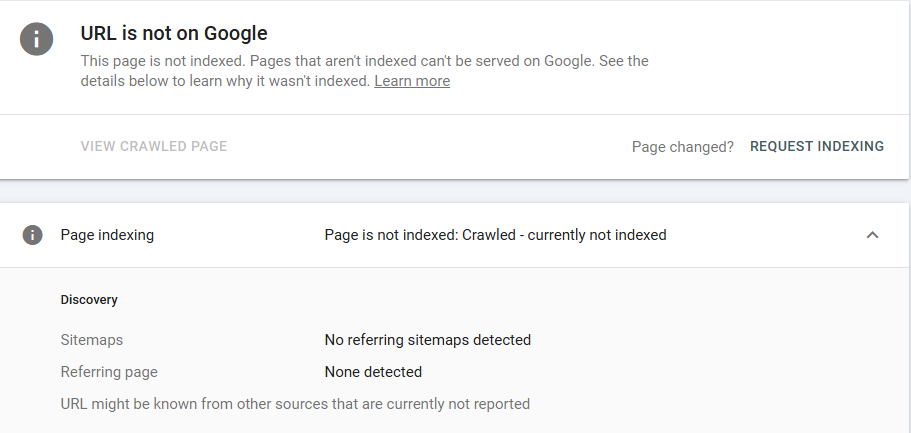
The message for the reader here has to be clear:
sometimes the problem is not crawling, it is that the page is not judged worth indexing.
Why Log Analysis Changes the Game (Optional but Powerful)
Search Console gives you a summary of crawl behaviour. Log files, on the other hand, give you the real behaviour — that’s the signal.
Log analysis makes the following clear:
- The URL groups Googlebot spends most of its time on
- How much of the budget parameter or filter pages absorb
- How often critical pages are actually crawled
On large sites in particular, the definitive answer to “do I have a crawl budget problem?” cannot really be given without log data.
The Main Output of the Diagnosis
By the end of this section you should be clear on this:
- Is the problem really crawl budget?
- Or is crawling happening, but going to the wrong places?
- Should the intervention be to the infrastructure, to the content structure or to the alignment of signals?
Every step taken before that is clear causes the problem to shift rather than be solved.
The Crawl Budget Optimisation Recipe: What Should I Fix First?
Crawl budget optimisation is not about “trying to fix everything”.
The right approach is to start with the areas that consume the most budget, pulling Googlebot’s focus back together step by step.
The order below is arranged to create the highest impact in the shortest time.
- Parameter and filter management (highest ROI) : Filter and parameter URLs are the areas that drain the budget fastest. The main version has to be made clear with a canonical; and the difference between noindex and robots.txt has to be read correctly: noindex affects indexing, robots affects discovery. On faceted structures, which filters are indexable and which exist only to serve the user has to be tied to an explicit rule set.
- Sitemap clean-up (only valuable 200 OK pages) : The sitemap gives Google a “priority list”. Leaving redirects, 404s, noindexed or non-canonical pages in the sitemap is a deliberate waste of the bot’s time. A sitemap should only contain the URLs you genuinely want indexed.
- Server performance and error codes : 5xx errors and timeouts trigger the crawl rate limit directly. Simple performance improvements, using a CDN and caching, and lowering TTFB are the most basic factors that raise Googlebot’s crawl tempo.
- Internal linking: take the bot where the money is : Orphan pages produce an “unimportant” signal for Google. The most valuable category and landing pages have to be supported with a shorter click distance and more internal links. The bot decides what matters by looking at the internal link structure.
- Reduce thin and duplicate pages : Low-value or repetitive pages pull down both the budget and the quality signal. In some cases noindex is enough; but some content genuinely has to be consolidated or removed. The aim is not to reduce the number of pages but to raise their average value.
The main message of this section is this: Crawl budget optimisation is not a list of technical settings; it is a problem of resource management.
The Crawl Budget Optimisation Recipe: What Should I Fix First?
Crawl budget optimisation is not about fiddling with settings one by one; it is about steering Googlebot’s crawl behaviour systematically over time.
That is why the work has to be tackled starting with “whatever has the highest impact”. Otherwise the improvements either make no difference or land in the wrong areas.
Parameter and Filter Management (Highest ROI)
Faceted navigation is the most aggressive consumer of crawl budget.
A crawl run with Screaming Frog usually shows dozens of parameterised variations of the same category content being crawled.
The critical distinction here is this:
canonical is a consolidation signal,
noindex is an indexing signal,
robots.txt affects discovery.
When these signals conflict, Googlebot keeps crawling the URLs. So which filters are indexable and which exist only for UX purposes has to be tied to a clear rule set.
Sitemap Clean-Up (Only Valuable 200 OK URLs)
The sitemap offers Google a “priority crawl list”.
When Screaming Frog or the GSC sitemap reports are examined, redirects, 404s, noindexed or non-canonical URLs sitting in the sitemap turn out to be a common error.
That sends Googlebot a contradictory message: “I want you to crawl this page, but do not index it.”
As a result the bot spends its time on the wrong URLs. A sitemap should consist only of canonical, indexable and strategic pages.
Server Performance and Error Codes
The crawl rate limit is extremely sensitive to server behaviour.
If log files or GSC Crawl Stats show 5xx errors, timeouts or erratic response times, Googlebot automatically lowers its crawl rate.
The improvements made here are usually not complicated:
Using a CDN, cache policies and TTFB optimisation affect crawl capacity directly. This area is one of technical SEO’s “quietest but most effective” points.
Internal Linking: Steering the Bot to Priority URLs
Googlebot reads the internal link structure as a priority map of the site.
If a Screaming Frog crawl shows strategic pages sitting at a high click depth, that is a signal problem.
Orphan pages mean low priority as far as Google is concerned.
The most valuable category and landing pages have to be pulled to a shorter click distance through the main navigation and contextual links. That raises crawl demand directly.
Reducing Thin and Duplicate Pages
Crawl budget is drained not only by technical URLs but by low-value content as well.
When Screaming Frog, GSC and the indexing reports are read together, the clusters of thin content that are crawled but never indexed stand out clearly.
In some cases noindex is enough. But on large sites in particular, removing or consolidating content that genuinely has no value both relieves the crawl budget and strengthens the overall quality signal of the site.
Closing: Crawl Budget Is Not a Metric, It Is Resource Management
Crawl budget is less a metric to track than a resource that has to be managed. Everything we have covered in this guide comes down to a single question:
Is Googlebot really spending its time on the URLs that matter?
The short list below gives you a practical control framework for clarifying the situation quickly:
- Check the Search Console → Crawl Stats report
- Look at parameter and filter URLs grouped together
- Make sure the sitemap contains only canonical, 200 OK and indexable pages
- Clear out 404s, soft 404s and URLs that contain redirect chains of any length
- Identify orphan pages and gaps in internal linking
- Review server response times and 5xx / timeout signals
- Read the crawl data against the Indexing report side by side
The aim of these steps is not to get “more crawling”; it is to produce more value from the same crawling.
Most crawl budget problems come not from a missing setting, but from a missing diagnosis.
The data is there, but how to read it is not clear. At that point the problem is not with Google; it is with the way the data is being looked at.
If you would like, we can read the Crawl Stats and Indexing reports in Search Console together and pin down which URL groups are eating your crawl budget in a 30-minute analysis.
The aim is not more technical detail; it is focusing on the right place.
Frequently Asked Questions About Crawl Budget (FAQ)
What is crawl budget?
Crawl budget is the time and request capacity Googlebot sets aside for crawling your website. Google does not crawl every site without limit; it wants to use its resources efficiently. So which pages are crawled, and how often, is a question of priority. Crawl budget is a precondition for indexing, but it is not a guarantee of indexing.
Does crawl budget matter for every site?
No, it is not a critical problem for every site. On small sites with a limited number of URLs the issue is usually crawl efficiency rather than crawl budget. On large e-commerce, classifieds, news or heavily filtered sites, however, crawl budget can affect visibility directly. So the structure of the site has to be assessed properly first.
What is the difference between crawl budget and indexing?
Crawling is Googlebot visiting a page; indexing is that page being added to Google’s index. A page can be crawled and still not indexed. That usually comes down to quality, duplicate content or conflicting signals. So crawl problems do not always mean indexing problems.
Why does crawl budget go to waste?
Crawl budget is most often wasted on URL parameters, filters, internal search pages, redirect chains and soft 404s. While Googlebot crawls URLs that produce no value, it spends less time on the pages that really matter. The problem is not that Google crawls too little, but that it crawls the wrong places.
How do I know whether I have a crawl budget problem?
The Crawl Stats report in Search Console has to be read together with the Indexing report. If crawl requests are rising while 404s, 5xx errors or “crawled – currently not indexed” counts rise too, that points to inefficient crawling. Where it is needed, log analysis shows exactly where Googlebot actually spends its time.