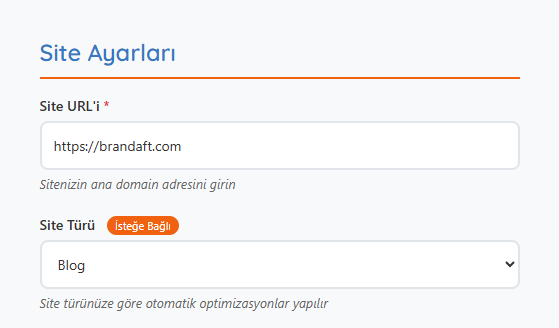
Site Settings
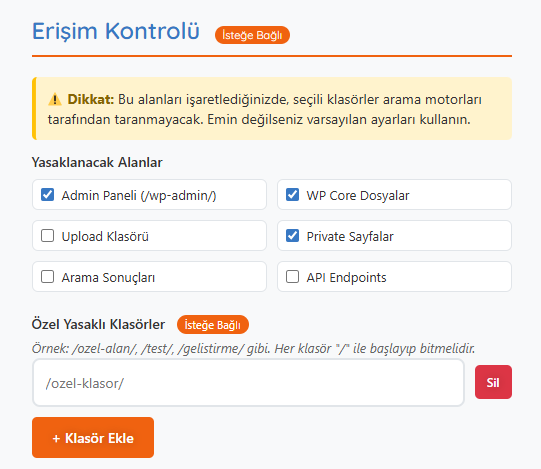
Access Control Optional
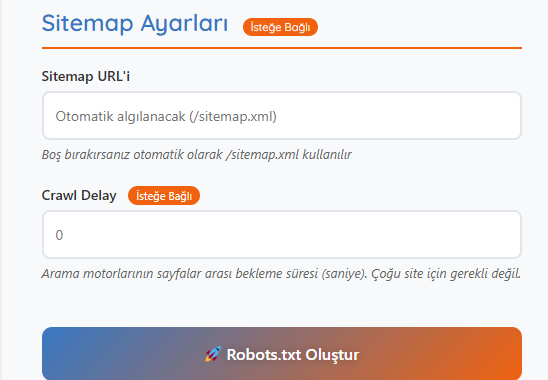
Sitemap Settings Optional
💡 Pro Tip
Your robots.txt file directly affects your SEO performance. Make sure you don’t accidentally block important pages!
If you want to control how search engines crawl your site, you don’t need complex coding knowledge. With Brandaft’s free robots.txt generator, you can create a robots.txt file tailored to your website in just a few steps. Instead of advanced settings, just enter your domain and choose your rules in our user-friendly interface. You can exclude specific pages from crawling or allow certain bots. Remove technical barriers to SEO today.
With this tool, both non-technical users and SEO experts can get a robots.txt solution tailored to their needs in seconds. You get clear answers to questions like “How does Google see your site?” and “Have you blocked private pages?” You can define separate rules for mobile and desktop versions and even include your sitemap. In short, if you want to stay in control of your SEO, you’re in the right place.
Create your professional robots.txt file in minutes
Your robots.txt file directly affects your SEO performance. Make sure you don’t accidentally block important pages!
times so far
Would you like to hear about our new SEO tools and free SEO tips from us?
We don’t send spam. You can unsubscribe at any time.
With the robots.txt generator, you can create a robots.txt file tailored to your site in minutes. Enter your domain, choose your site type and select the folders you want to block. After adding your sitemap URL, preview the settings and create your file. Finally, download it as a .txt file or copy it to your clipboard and apply it directly to your site. Creating an SEO-friendly, professional setup without technical knowledge is that easy!


A robots.txt generator is a tool that helps you create a robots.txt file telling search engine bots which pages of your website to crawl and which to skip. This file is an important control mechanism for SEO. It helps with page speed, resource usage and privacy. It lets you configure things correctly without technical knowledge.
By defining which folders search engines crawl, a robots.txt file reduces server load and prevents unnecessary content from being indexed. It’s especially used to hide admin panels, upload folders or private pages. This makes your SEO strategy work more efficiently. That is why creating a robots.txt file is recommended for every website.
Every site owner needs one, including bloggers, businesses, e-commerce sites and developers. A robots.txt file is especially critical for anyone doing SEO. Search engines like Google crawl your site according to this file. You can handle it easily with a professional robots.txt generator.
Admin panels and private folders such as /wp-admin/, /login/ and /files/ are usually blocked from crawling. Unnecessary pages such as file archives like PDFs, special campaign pages or search results can also be blocked. That way, search engines only crawl your valuable content. You can make these choices easily in our robots.txt generator.
If you don’t have technical knowledge or aren’t familiar with the file structure, tools like a robots.txt generator are safer and more practical. A single coding error can even get your entire site dropped from the index. Brandaft’s tool prevents common mistakes and provides the correct configuration. It’s both safe and time-saving.
It’s done by adding the line Sitemap: https://yoursite.com/sitemap.xml at the bottom of your robots.txt file. This helps search engines crawl your site more efficiently. In our tool, this field is filled in automatically or can be entered manually. For SEO, we strongly recommend including this line.
Crawl delay defines how long search engine bots wait between pages. It’s mainly used to reduce bot load on slow servers. Brandaft’s robots.txt generator offers this setting flexibly too. It protects site performance by preventing unnecessary crawling load.
Just upload the file you created to your site’s root directory (for example: domain.com/robots.txt). Brandaft’s tool lets you download the file or copy it to your clipboard. You can upload it via FTP or add it with the cPanel file manager. Once it’s in the right place, search engines recognize the file automatically.