Free Backlink Checker and Analysis Tool
Analyze Your Website’s Backlink Profile Instantly
If you’re wondering which sites link to your website, you can check your site’s backlink profile in seconds with Brandaft’s free backlink checker. Enter your domain to query the backlinks pointing to your site and review which domains and pages they come from on a single screen. You can run a site backlink check without any technical knowledge or complex SEO software and get a quick overview of your backlink profile.
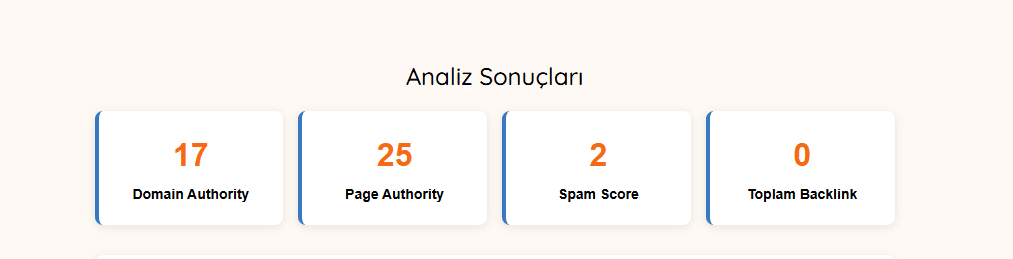
The backlink analysis tool draws on Moz Link Explorer data to show SEO metrics such as Domain Authority (DA), Page Authority (PA) and Spam Score for the links it finds. So you don’t just see the backlinks pointing to your site; you can also compare link sources and decide which backlinks need a closer look. However, DA, PA and Spam Score are third-party SEO metrics; on their own, they don’t definitively show whether a backlink is high quality or harmful. When assessing backlink quality, the linking site’s topical relevance and trustworthiness, and the content the link sits in, should also be taken into account.
How Do You Check Backlinks?
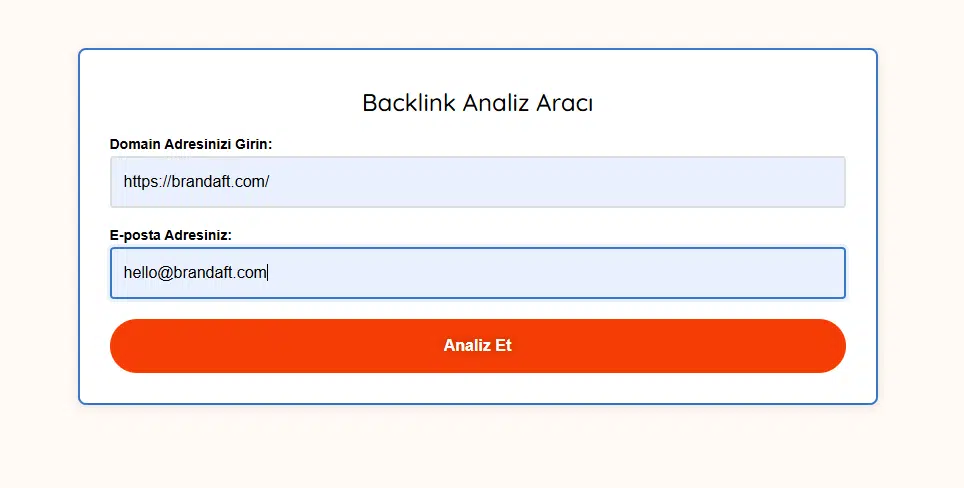
With Brandaft’s free backlink checker, you don’t need to install any SEO software or do anything technical to check the links pointing to your website. Enter your domain to start the check and review the backlink sources found together with core SEO metrics. A backlink check takes three simple steps:
Enter Your Website Address
Enter the domain of the website whose backlinks you want to check into the field in Brandaft’s backlink checker. Make sure you type the full website address so the analysis runs on the correct domain.
Start the Backlink Check
Click “Analyze” to start the backlink check. Drawing on Moz data, Brandaft’s tool quickly displays the backlink sources found for the domain and their related SEO metrics.
Review Your Backlink Results
Once the check is complete, you can review the sources linking to your website along with their Domain Authority (DA), Page Authority (PA) and Spam Score values. Use this data to compare different sources in your backlink profile and identify links that need a more detailed assessment.

What Data Can You See with a Backlink Check?
Brandaft’s backlink checker isn’t just for showing how many links point to your site. When assessing your backlink profile, you need to look together at which site and page a link comes from, the authority of the source domain and the quality signals associated with the link. Brandaft’s backlink analysis tool helps you assess your backlink profile more easily by presenting the links it finds together with Moz data.
Backlink Sources
You can view the domains and pages linking to your website and see where your links come from, giving you a clearer picture of how your backlink profile is distributed.
Domain Authority (DA)
You can compare the Domain Authority of the domains you get backlinks from. Developed by Moz, DA is a comparative SEO metric used to estimate a domain’s potential to rank in search results.
Page Authority (PA)
Page Authority helps you evaluate the specific page a backlink comes from separately from the domain as a whole, so you can review link sources not only at domain level but also page by page.
Spam Score
By viewing the Spam Score of backlink sources, you can identify links that need a closer look. Spam Score alone doesn’t show that a backlink is harmful; it should be assessed together with the link’s relevance, the source’s trustworthiness and other quality signals.
Why Should You Run a Site Backlink Check?
A site backlink check lets you see which domains and pages link to your website and regularly review your current backlink profile. “Who is linking to my site?” or “Which sites have given me backlinks?” — getting answers to these questions means more than just tracking link counts. Where backlinks come from and the quality of those sources matter for understanding your link profile.
By checking backlinks regularly, you can review newly found links, compare different sources and notice backlinks that need a closer assessment.
In particular, separating links from irrelevant or low-quality sites from backlinks from trustworthy sources related to your industry helps you understand the overall structure of your profile.
To make this assessment easier, Brandaft’s backlink checker shows link sources alongside DA, PA and Spam Score and similar metrics. However, when assessing backlink quality, these metrics should be considered not on their own but together with the source’s trustworthiness, its relevance to your content and the natural context of the link.
How Do You Interpret Backlink Check Results?
When assessing the data from a backlink check, focusing only on link count or a single SEO metric can be misleading. To understand a backlink’s quality, the linking site’s relevance to your industry, the quality of its content and the context of the link on the page should be assessed together with metrics such as Domain Authority (DA), Page Authority (PA) and Spam Score.
For example, not every backlink from a site with high DA is automatically high quality. A link that is irrelevant to your topic or unnatural may not deliver the expected value despite a high authority metric.
Similarly, a high Spam Score doesn’t mean a backlink is directly harmful. It should be treated as one of the indicators that the link source needs a more detailed look.
DA, PA and Spam Score are third-party SEO metrics developed by Moz and are not ranking factors used directly by Google. That is why you can use the metrics in Brandaft’s backlink checker to compare link sources and review your backlink profile more thoughtfully, rather than to make a definitive “good backlink / bad backlink” decision.
When assessing your backlink profile, the key question isn’t just “How many backlinks do I have?” but also “Where are these links coming from, and how relevant are they to my website?” — that’s the question to ask.
The tool gives you the table. Telling the valuable links from the harmful ones and preparing a disavow file is the next step, and we walk through it in our guide on how to run a backlink analysis (in Turkish).
FAQs
To check backlinks, just enter the domain of the website you want to analyze into a backlink checker. In Brandaft’s free tool, enter your domain and click “Analyze” to start the check. The tool shows the backlink sources it finds together with metrics such as DA, PA and Spam Score, so you can quickly review your website’s backlink profile without installing any SEO software.
To find out who links to your website, you can check your domain with a backlink analysis or checker tool. The results show the domains linking to your site and the pages the backlinks come from. Brandaft’s backlink checker lets you review these sources together with Moz data and related SEO metrics. Keep in mind that different tools have their own backlink indexes, so the links found and total backlink counts can vary between platforms.
A site backlink check is the process of reviewing the links pointing to a specific website from external sources. It lets you see which domains and pages link to your site and review the overall structure of your link profile. Checking backlink sources regularly also helps you notice new links or links that need a closer look. When assessing link quality, look not only at the number of links but also at the trustworthiness of the sources and their topical relevance to your site.
Backlink checks help you understand which sources make up your website’s link profile. Regular checks let you spot newly found backlinks, compare link sources and take a closer look at links that seem irrelevant or suspicious. Tracking changes in your backlink profile over time also helps you assess your site’s off-page SEO. However, an increase or decrease in backlink count alone doesn’t give a definitive picture of SEO performance.
The data shown can vary depending on the backlink tool and its data source. Brandaft’s free backlink checker provides the backlink sources it finds along with Moz metrics such as Domain Authority (DA), Page Authority (PA) and Spam Score. You can use this data to compare different link sources and get an overall assessment of your backlink profile. Keep in mind that DA, PA and Spam Score are not direct ranking metrics used by Google.
A backlink’s quality can’t be determined by looking at a single metric such as DA or PA. The trustworthiness of the linking website, its relevance to your industry or topic, the quality of the content containing the link and whether the link is used in a natural context should all be assessed together. A link from a site with high authority but no topical relevance may be worth less than a backlink from a more relevant source. Similarly, a high Spam Score alone doesn’t prove a link is harmful.
No, there’s no guarantee that backlink checkers will show every backlink pointing to your website. Platforms such as Moz, Ahrefs and Semrush use their own crawling systems and backlink indexes, so they can show different links and backlink counts for the same domain. Google Search Console data also doesn’t have to match third-party SEO tools exactly. That is why backlink check results should be used as a strong data source for assessing a site’s link profile, but not interpreted as a definitive, complete list of every link on the internet.

